Best Body Measurement Apps for iPhone: 10 Compared
Looking for the best body measurement app for your iPhone? We searched the App Store, read the reviews, good and bad, and compared ten apps side by side. One of them is ours. We make Progress, so we’ve worked hard to keep this fair, and we’ll tell you plainly when another app is the better choice for you.
How we compared them
Here’s exactly what we did, so you can judge it for yourself.
- We searched the US App Store for “best body measurement app”, “best app for body measurements”, “app to track body measurements” and “body measurement tracker”, and noted the apps that came up.
- We read each app’s App Store page: its description, its rating, its in-app purchases, its privacy label and the date of its last update.
- We read each app’s recent and most helpful US reviews, the unhappy ones as well as the happy ones.
- We checked everything on 26 November 2026. Apps change, so prices and ratings may have moved since. Every app’s name links to its App Store page, which is our source for each claim unless we say otherwise.
Two things we didn’t do. We didn’t test every app for weeks, so this is a comparison of what each app offers and what its own users say, not a lab test. And we left out apps that only work with their maker’s smart scale, such as RENPHO Health and arboleaf. If you own one of those scales, its app is the natural place to start.
The short answer
| If you want… | Try |
|---|---|
| Measurements, photos and weight in one place | Progress |
| A free, no-frills measurement log | Body Measurement Tracker Log |
| A simple app with guidance on how to measure | My Body Measurement Tracker |
| Photo GIFs, widgets and GLP-1 tracking | FormaTrack |
| No tape measure at all | MeThreeSixty or ZOZOFIT |
| Only your weight, with a clear trend | Happy Scale |
| Weight for the whole family | Monitor Your Weight |
| An Apple Watch and Mac app | Body Size |
| The widest list of built-in measurements | Remeasure Body |
At a glance
| App | US rating | Ratings | Price | Apple Health | Photos | Last updated |
|---|---|---|---|---|---|---|
| Progress | 4.6 | 9,393 | Free, Pro from $3.99 a month | Yes | Yes, with Pro | Nov 2026 |
| Body Measurement Tracker Log | 4.6 | 116 | Free | Not listed | Not listed | Oct 2026 |
| My Body Measurement Tracker | 4.8 | 87 | Free for 5 body parts, then Pro | Weight and waist | Not listed | Sep 2026 |
| FormaTrack | 4.4 | 210 | Free, Premium $12.99 a month | Yes | Yes | Nov 2026 |
| MeThreeSixty | 4.7 | 18,422 | Free scans, Premium from $4.99 a month | Yes | 3D scans | Oct 2026 |
| ZOZOFIT | 4.7 | 8,104 | Free, Premium from $2.99 a month | Yes | 3D scans | Nov 2026 |
| Happy Scale | 4.9 | 58,252 | Free, Deluxe $1.99 a month | Yes | No | Nov 2026 |
| Monitor Your Weight | 4.8 | 24,066 | Free, $0.99 for sync | Yes | Not listed | Nov 2026 |
| Body Size | 4.5 | 68 | Free, upgrades from $0.99 | Yes | Not listed | Apr 2026 |
| Remeasure Body | 4.5 | 1,404 | Free with adverts, $3.99 to remove | With the upgrade | Not listed | Mar 2021 |
“Not listed” means the app’s App Store page doesn’t mention it. Prices are the in-app purchases each page lists, and an app may show you a different offer.
1. Progress: measurements, photos and weight together
Progress on the App Store · 4.6 from 9,393 US ratings · updated November 2026
This one is ours, so read it with that in mind.
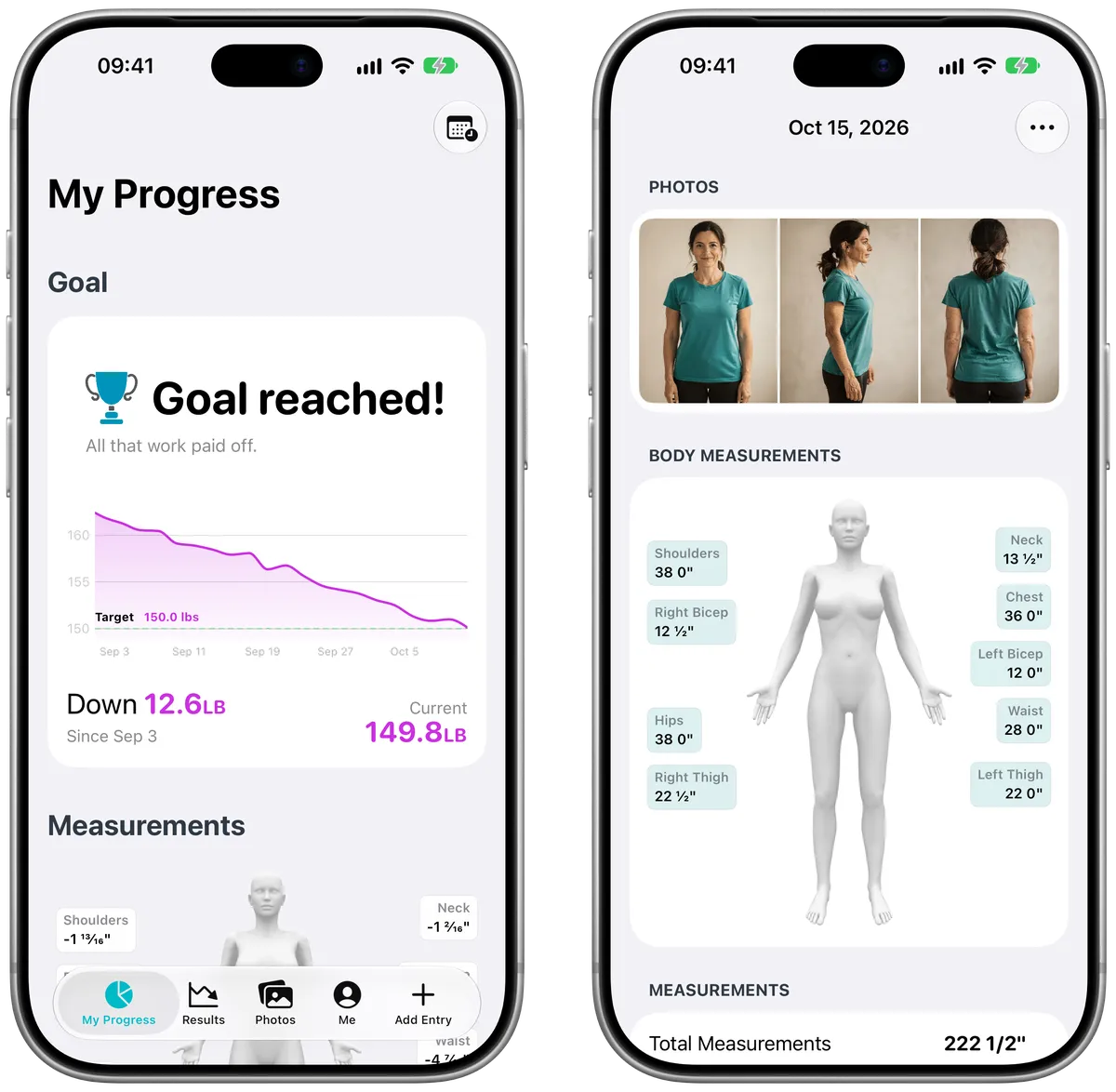
Progress is a body measurement tracker for iPhone, iPad and iPhone Duo. You can choose from 17 body measurements and add up to 10 of your own, alongside weight, body fat and BMI. You can take front, side and back photos, with a camera that shows your last photo faintly so each new one lines up, and compare any two side by side. It syncs both ways with Apple Health, and that part is free. Your data stays on your device and in your own iCloud, and there are no adverts.
What’s free and what isn’t. The free version tracks up to five measurements, with unlimited entries, charts, a weight goal and Apple Health sync. Photos, more measurements, past entries, notes, goals beyond weight and reports are part of Progress Pro. The App Store lists Pro at $3.99 to $5.99 a month, $11.99 to $19.99 a year, or $29.99 once for life.
Where it falls short. We read our own one-star reviews too.
- Between June and October 2026, a bug meant some long-time users, including people who had paid, saw the free version’s limits on features they already had (reviews from those months). We’re sorry it happened. We fixed it, and everyone got back everything they had. If it ever happens to you, tap Restore Purchase or get in touch from Help & Support in the app.
- Inches are entered as fractions, and a couple of people would rather type decimals (October 2026).
- New users answer a set of questions before they see what’s free, which some people find too long (August and September 2026).
- There’s no Apple Watch app and no Android app, and it won’t scan your body with the camera. You’ll need a tape measure.
Choose it if you want your measurements, photos and weight in one calm place, and you like seeing them next to each other.
If that sounds like you, you can download Progress from the App Store and try the free version first.
2. Body Measurement Tracker Log: free and simple
Body Measurement Tracker Log on the App Store · 4.6 from 116 US ratings · updated October 2026
A newer app, first released in August 2025, and the one that ranked first for “body measurement tracker” when we searched. It covers weight, waist, chest, hips, thighs, calves, biceps, triceps, forearms, neck and body fat, and you can add your own measurements with a name, unit and target. It has charts and reminders, needs no account, and syncs through your iCloud. Its privacy label says “Data Not Collected”, and its page lists no in-app purchases.
What reviewers say. There are only a few written reviews so far. One person likes that it’s simple and has custom measurements (July 2026). One person reported seeing an inappropriate advert when they opened it (May 2026), so expect some adverts.
Better than Progress if you only want to log measurements and you don’t want to pay anything. Its page doesn’t mention photos or Apple Health.
3. My Body Measurement Tracker: simple, with guidance
My Body Measurement Tracker on the App Store · 4.8 from 87 US ratings · updated September 2026
A tidy app that tracks biceps, calves, chest, forearms, hips, thigh, waist and weight, with 30-day and all-time trends and step-by-step instructions for each measurement. The free version tracks up to five body parts. Pro adds unlimited body parts, goals and custom measurements, and the App Store lists “Pro Access” purchases from $1.99 to $24.99. It syncs weight and waist with Apple Health.
What reviewers say. Almost all positive. People call it quick and easy, and one says the free version was all they needed (June 2026). One would like to see their overall change, not only the change since last time (July 2025).
Better than Progress if you want something small and guided, and five body parts is enough. Its page doesn’t mention photos.
4. FormaTrack: built around progress photos
FormaTrack on the App Store · 4.4 from 210 US ratings · updated November 2026
FormaTrack is built around photos. The camera overlays your last photo so every shot lines up, there’s a timer, and you can turn your photos into a GIF. It also tracks up to 25 measurements, left and right sides separately, and has Home Screen widgets, CSV export, Apple Health sync and optional GLP-1 dose tracking.
What it costs. The App Store lists unlimited photos at $3.99, and Premium at $12.99 a month, $39.99 a year or $119 for life.
What reviewers say. People love the overlay camera. Recent reviews are more mixed: some lost photos after an update (August 2026), one found photos weren’t restored from an iCloud backup (October 2025), and one was frustrated by adverts before using the camera (July 2026). Its privacy label includes “Data Used to Track You”.
Better than Progress if you want to turn your photos into a GIF, or you’d like GLP-1 tracking and Home Screen widgets in the same app.
5. MeThreeSixty: no tape measure needed
MeThreeSixty on the App Store · 4.7 from 18,422 US ratings · updated October 2026
MeThreeSixty scans your body with your iPhone’s camera. You stand in two poses, front and side, and it builds a 3D avatar with more than 16 measurements. Its page says scanning is “always free” and that your photos never leave your device. It also tracks weight, body composition, goals and GLP-1 doses, and syncs with Apple Health. Premium is listed from $4.99 a month or $29.99 a year.
What reviewers say. Long-time users say the scans kept them motivated when the scales didn’t move (July and August 2026). Others had a hard time with updates: several couldn’t open the app in August 2026, and one said their old scans were locked after an update (October 2026).
Better than Progress if you’d rather not use a tape measure, or you find it hard to measure yourself. A scan is an estimate, so it’s best for watching the trend.
6. ZOZOFIT: 3D scans with a food journal
ZOZOFIT on the App Store · 4.7 from 8,104 US ratings · updated November 2026
ZOZOFIT also scans your body, giving measurements for 16 areas in under two minutes, with side-by-side comparisons and goals for each area. It adds a food journal and Apple Health sync. Premium is listed from $2.99 a month or $19.99 a year. It needs iOS 18.6 or later.
What reviewers say. Many people find it motivating. The most common complaint is accuracy: some found their scan a few inches away from their tape measure, or different from one scan to the next (September to November 2026).
Better than Progress if you want scanning and food logging in one app. As with any scan, compare each result with your last one, not with a tape.
7. Happy Scale: if weight is all you track
Happy Scale on the App Store · 4.9 from 58,252 US ratings · updated November 2026
Happy Scale isn’t a body measurement app, and it doesn’t claim to be. It does one thing very well: it smooths your daily weigh-ins into a trend, so one high day doesn’t knock your confidence. It breaks a big goal into small milestones and predicts where you’re heading. It syncs with Apple Health and between iPhone and iPad. Deluxe is listed at $1.99 a month, $11.99 a year or $39.99 for life.
What reviewers say. It has the highest rating here, and people have used it for years. One person was disappointed that notes need a paid plan (June 2026).
Better than Progress if weight is the only number you want to follow. If you’d like to see more than the scales, it works well next to a measurement app, since both can share weight through Apple Health.
8. Monitor Your Weight: weight for the whole family
Monitor Your Weight on the App Store · 4.8 from 24,066 US ratings · updated November 2026
On the App Store since 2011, this is a weight tracker first. It keeps separate profiles for family members, suggests a target, and works with Apple Health and with Garmin, Withings and Aria scales. Its page says it tracks “various body measurements in addition to weight”. The only in-app purchase listed is a $0.99 sync option.
What reviewers say. People like how simple it is. In late July 2026 several people reported that their history had disappeared after an update, and others missed graph features that had changed (August and October 2026). Its privacy label includes “Data Used to Track You”.
Better than Progress if weight comes first for you, you want several profiles, and you’d like to pay very little.
9. Body Size: on your Apple Watch and Mac
Body Size on the App Store · 4.5 from 68 US ratings · updated April 2026
Body Size tracks more than 18 measurements and turns them into 16 statistics, such as body build. Its page says it works on iPhone, iPad, Apple Watch and Mac, has widgets, shows no adverts even in the free version, and keeps your data in Apple Health and iCloud. Its privacy label says “Data Not Collected”. Upgrades are listed from $0.99 to $29.99.
What reviewers say. People enjoy the statistics. Some wanted to add their own measurements or hide ones they don’t use (2023 and 2024), and one found the plus and minus buttons awkward for entering numbers (July 2025).
Better than Progress if you want your measurements on your Apple Watch or Mac, or you enjoy lots of calculated statistics.
10. Remeasure Body: the longest list of measurements
Remeasure Body on the App Store · 4.5 from 1,404 US ratings · last updated March 2021
Remeasure shows 28 standard measurements on a body outline, plus 12 custom ones, with targets, graphs and built-in calculators for BMI, waist-to-height ratio, waist-to-hip ratio and body fat. It’s free to use online with adverts. The upgrade, listed at $2.99 to $3.99, removes adverts, connects to Apple Health and lets you use it offline.
What reviewers say. People who like it really like the detail. The worry is that it hasn’t been updated since March 2021. Reviews mention adverts that wouldn’t close (2022 and 2023), and one person said they still saw adverts after paying (July 2026).
Better than Progress if you want the most built-in measurements for a small one-off price, and you’re comfortable with an app that isn’t being updated.
Two more we looked at
- BodyBarista (4.5 from 336 US ratings) estimates measurements from mirror photos. Most of its written reviews are several years old, so we couldn’t tell how well it works today.
- Body Measurement & Tracker (4.5 from 74 US ratings) is a simple log with charts. Reviews from 2024 say the free version only tracked weight, waist and height.
How to choose
A few questions make the choice easier.
- Do you want to use a tape measure? If not, try a scanning app. If you do, our guide on how to take body measurements shows where to put the tape.
- Do photos matter to you? Some changes show up in a photo before they show up in a number. Here’s how to take before and after photos you can compare fairly.
- How many measurements will you keep up with? Two or three, taken regularly, tell you more than fifteen taken once. It helps to decide when to take your measurements and stick to it.
- Where should your data live? Check each app’s privacy label, and whether it syncs with Apple Health so you’re free to move later.
The best app is the one you’ll keep opening. Whichever you choose, we hope it helps you see how far you’ve come.