
Progress on iPhone Duo and iPad: Made for Bigger Screens
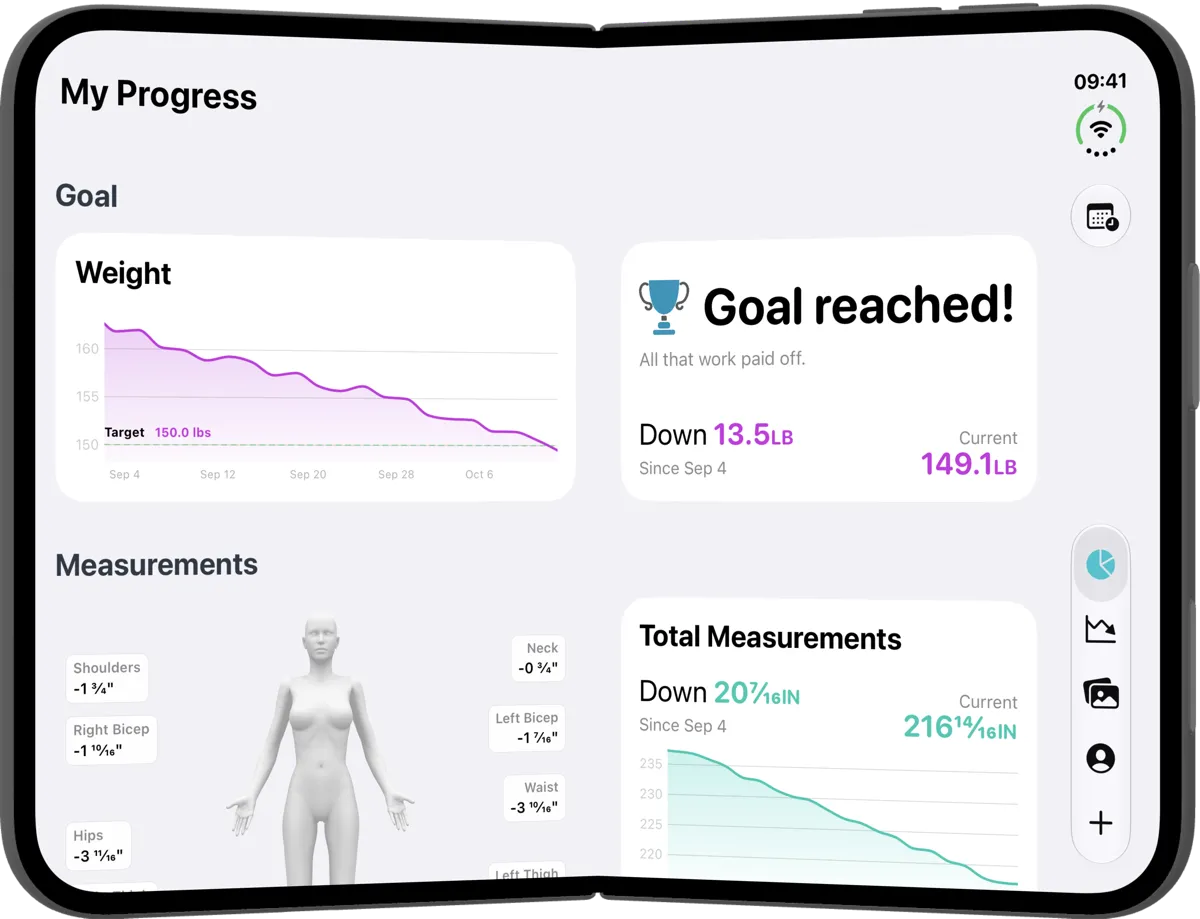
If you’ve got your hands on the new iPhone Duo, or you like to check in on your progress from an iPad, we’ve got good news. Progress has been redesigned to make the most of a bigger screen, however you hold it or fold it.
Sharper, better-framed progress pics
Photos are one of the most motivating ways to see how far you’ve come. Sometimes the changes are clearer in a picture than in any number. So the camera got the most attention.
On iPhone Duo, your front-camera photos are now much sharper, and the preview shows the same generous framing as Apple’s own Camera app. What you see on screen is what you get in your photo.
The camera also adapts to how you’re holding your Duo:
- Open and flat on its side: the preview sits in the middle, with the shutter and controls down the right-hand edge.
- Folded like a book: everything moves to the side with the camera, so you can stand the phone up and take a hands-free photo.
- Folded like a laptop: the camera fills the top half, with nothing hidden in the fold.
A small label at the top of the preview shows which pose you’re taking, front, side or back, so your photos line up nicely when you compare them later.
There are a few handy touches for every iPhone too. The shutter is bigger, the timer now offers 3, 5 or 10 seconds, and you can press a volume button to take your photo.
Picking up a new iPhone Duo? Download Progress from the App Store and take your first progress pic with the new camera.
Your goal and measurements, side by side
On a wider screen, My Progress no longer stretches everything across the full width. Your goal chart and your goal summary now sit next to each other, and your body figure sits beside your total measurements. It’s easier to take everything in at a glance.
On iPhone Duo, the layout even follows the fold, so nothing important lands in the crease.
Results and entries together
When you open the Results tab on an iPad, an open iPhone Duo, or a larger iPhone held on its side, your entries now sit on the left and the one you’ve picked opens on the right. Tap through your entries to look back over your journey, without bouncing back and forth between screens.

On iPad, Progress now fills the whole screen too, rather than showing a scaled-up iPhone window.
Adding measurements with the guide alongside
When you add your measurements with your Duo open, or on an iPad in landscape, the illustration and instructions sit on the left and the keypad and ruler sit on the right. You can check exactly where to measure without tapping anything. Fold your Duo like a book and the guide and controls sit either side of the fold.

If you’re on a regular iPhone, we’ve made adding measurements quicker and easier too. You can read all about it here.
Comparing photos
On an iPhone, or an iPhone Duo when it’s closed, photo compare opens on its side with your photos next to each other, ready to see your before and after. Unfold your Duo and it fills the big inner display, so you can really see the difference.

When you open a single photo, the tab bar slides out of the way so your photo gets the space it deserves.
A welcome that fits
New to Progress on an iPad? The welcome screens have been redesigned to fit the screen nicely in landscape, so getting started feels just as easy as it does on an iPhone.
Bigger screen, same Progress
Everything you know and love about Progress works just the same. It simply makes better use of the space you’ve got. We hope it makes checking in on your progress feel even more rewarding, whatever device you’re using.