What is Lean Body Mass?
Lean body mass is everything in your body except fat. That’s your muscles, bones, organs and water. Take your total weight, subtract the weight of your body fat, and what’s left is your lean body mass.
It’s a different number from muscle mass, which counts only your muscles. Lean body mass is the bigger picture.
Why track lean body mass?
The scales can’t tell you what your weight is made of. Lean body mass can.
If you’re building muscle, it’s the number that shows your training is working, even when your weight barely moves. And if you’re losing weight, it helps you see that you’re losing fat while keeping the muscle that makes you strong.
Every body is different, so there’s no single number to aim for. What matters is how yours changes over time.
Want a quick answer now? Try our free lean body mass calculator. It works from your body fat percentage, or from your height and weight if you don’t know it yet.
How is lean body mass worked out?
There are two ways, and Progress uses whichever fits what you track.
With your body fat percentage. If you know your body fat percentage, the sum is simple. Someone who weighs 80 kg (176 lb) with 20% body fat is carrying 16 kg of fat, so their lean body mass is 64 kg (141 lb).
With your weight and height. No body fat reading? That’s fine. Your lean body mass can be estimated from your weight, height and sex with the Boer formula, a well-known estimate. For a man who weighs 80 kg (176 lb) and is 5'10" (178 cm), it gives about 57 kg (126 lb).
The estimate is a good guide for most people. A body fat reading makes it more personal, so if you’d like one, here’s how to measure your body fat percentage.
Track your lean body mass in Progress
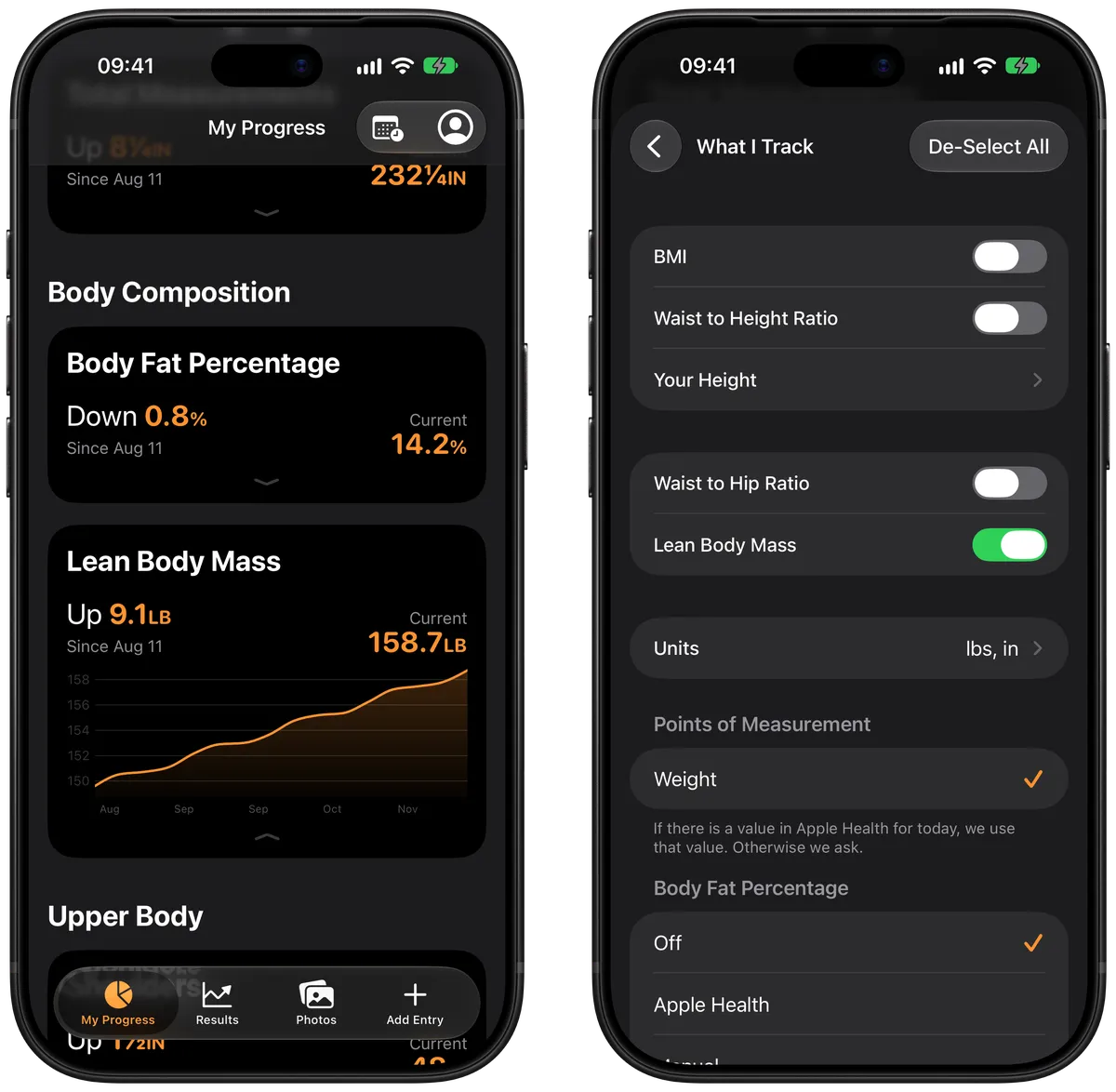
Progress works out your lean body mass every time you add your weight. You don’t need a smart scale or a body fat reading, only your height. It works the same whether you measure in pounds, stones or kilograms, and inches or centimetres.
You’ll see it on My Progress with its own chart, so you can watch it change alongside your weight and measurements. If you haven’t tried Progress yet, download Progress from the App Store and start with your very next weigh-in.
How to turn it on
Lean body mass is part of Progress Pro.
- Open My Progress and tap the person icon to open Me.
- Tap What I Track.
- Switch on Lean Body Mass.
- If you don’t track body fat, set Your Height on the same screen.
That’s it. Add your weight as usual and we’ll do the sums.
Lean body mass in Apple Health
If you’ve allowed Progress to write to Apple Health, we save your lean body mass there each time you add an entry. You can read more about how Progress works with Apple Health.
Want to tidy up a value in Apple Health? You can remove any reading you no longer want:
- Open the Health app and tap Browse.
- Tap Body Measurements, then Lean Body Mass.
- Scroll down and tap Show All Data.
- Tap Edit, then delete the readings you don’t need.
Your entries in Progress stay exactly as they are.